Velox Linux
v8.3.1 "Horny Rhino" — Now Available

Shape It. Race It. Own It.

Velox is an Arch-based rolling-release distro built for everyone — whether you're escaping Windows for the first time or a power user who wants a fast, secure, no-compromises system.

⬇ Download v8.3.1 GitHub →

Arch-based  ·  Rolling release  ·  Wayland-first  ·  Free & open-source

Coming from Windows? You're going to feel right at home.

Velox was designed so you don't need to know what a terminal is to have a great system. Everything you expect is already there.

🪟

Familiar Desktop Layout

Taskbar at the bottom, app launcher, system tray, clock — Velox's KDE and Cinnamon desktops look and feel like what you're already used to. No relearning how to use a computer.

🖱

Graphical Installer

Click through the Calamares installer just like any Windows setup wizard. Pick your language, timezone, username, and partition — done. No commands, no config files.

🎮

Your Apps Are Already Here

Firefox, VLC, OBS Studio, GIMP, VS Code are pre-installed. Steam, Lutris, Heroic, Discord, Spotify, and thousands more are one click away in the Velox Control Center — including a full gaming setup without touching a terminal. Many Windows apps may also run on Velox via Wine or compatibility layers.

🔄

Updates That Don't Surprise You

One-click system updates from the Velox Control Center. No restart required for most updates, no Windows Update rebooting you mid-project. You update when you want to.

🎯

Software Center Built In

Search and install thousands of apps from the Velox Control Center — no need to find websites, download EXEs, or click through installers. It's like an app store, but everything is free.

🛡

No Antivirus Required

Linux doesn't need antivirus software. Malware that targets Windows simply doesn't run here. Velox adds its own AUR scanner on top for an extra layer of peace of mind.

💰

Completely Free — Forever

No license fees, no subscriptions, no activation keys. Velox Linux is open-source software and always will be. Download it, install it, and keep it as long as you want.

Your Old PC Feels New Again

Velox runs fast on hardware that Windows 11 struggles on. The linux-velox kernel and performance tuning mean even older machines get a second life with smooth, responsive performance.

Arch Linux — without the headaches

Velox (Latin: swift, fast, rapid) is an Arch-based distribution that gives you the full power of a rolling-release system with a polished installer, a curated software stack, and a custom control center that solves the four most common reasons people give up on Arch.

Three fully-themed desktops — KDE Plasma, Cinnamon, and XFCE — all running Wayland. Choose at install time.

3Desktop Choices
4Arch Problems Fixed
15Custom Wallpapers
25×Faster Downloads
The heart of Velox Linux

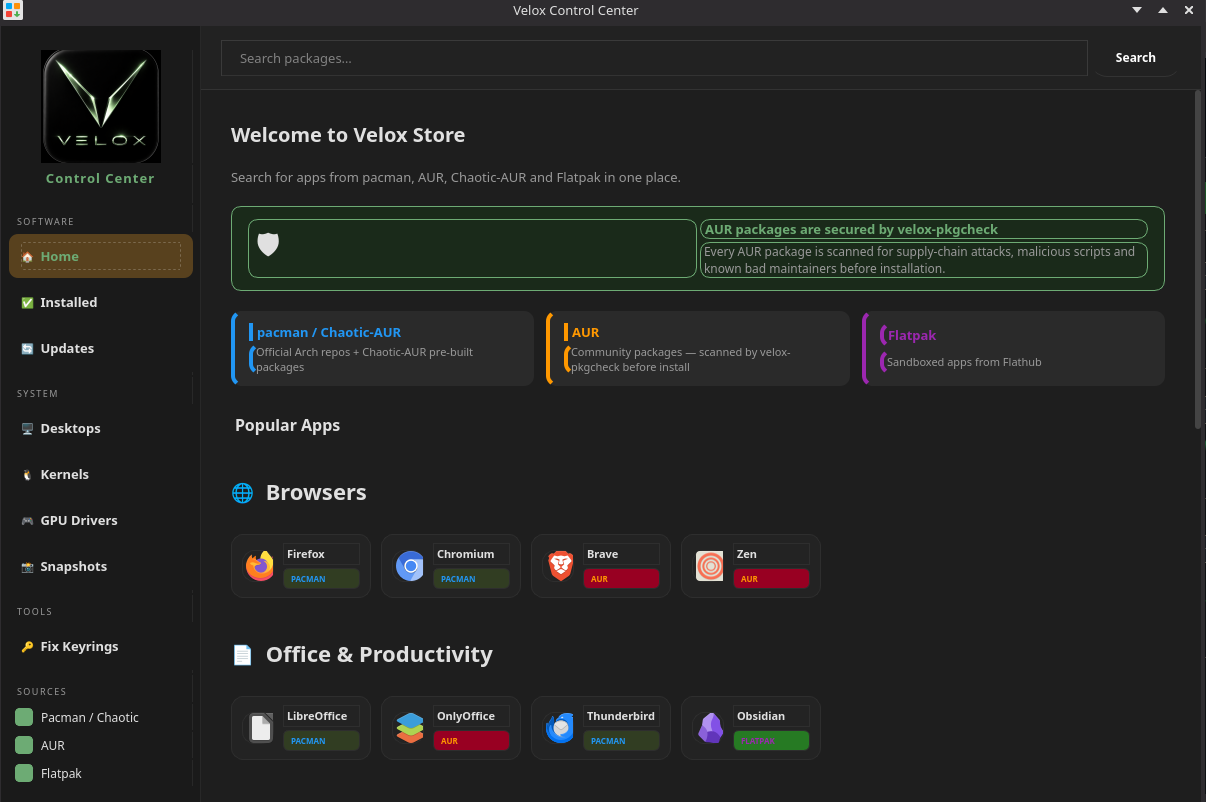
One app for everything — updates, drivers, kernels, AUR installs, snapshots, and more.

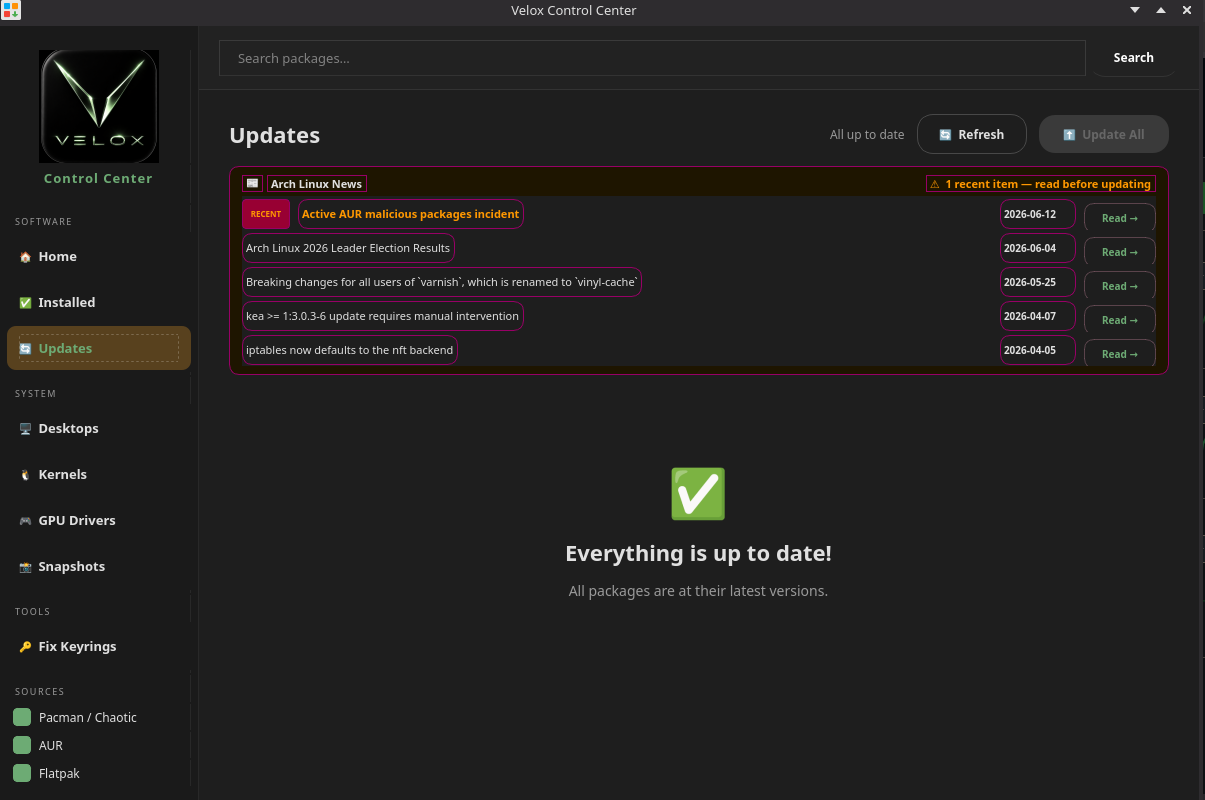
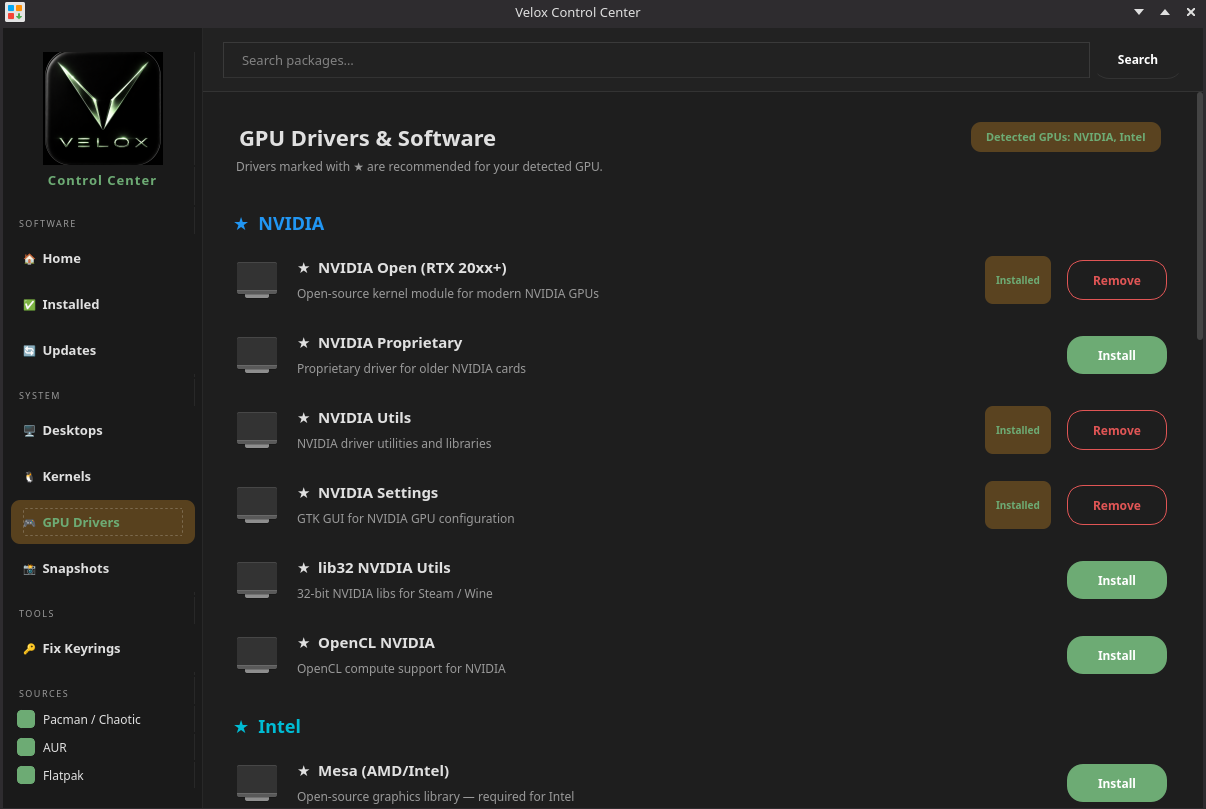
Velox Control Center Velox Control Center Updates Velox Control Center GPU Drivers
📦

Unified App Store

Search pacman, Chaotic-AUR, AUR, and Flatpak in one place.

🎮

GPU Drivers

Install NVIDIA, AMD, and Intel drivers with a single click.

⚙️

Kernel Switcher

Switch between linux-velox, linux-lts, linux-zen, linux-hardened, and linux-rt.

🖥

Desktop Environments

Add GNOME, XFCE, Cinnamon, Hyprland, and more alongside KDE.

📸

BTRFS Snapshots

Manage Snapper snapshots with a clean GUI — roll back anytime.

🔄

One-Click Updates

pacman + Flatpak in one button, with keyring refresh built in.

Four fixes that should ship with every Arch install

These aren't opinions — they're solutions to documented, recurring failures that have appeared in Arch forums and Linux press for years.

01
📰

Arch Linux News Feed

The Problem Arch occasionally requires a manual step before running an update — the news feed at archlinux.org is where these are announced. The ArchWiki explicitly says users are expected to check it before every upgrade. Almost nobody does.
The Fix The Control Center fetches the live Arch news feed every time you open the Updates tab. Items less than 14 days old are flagged RECENT in orange. If there are recent items when you hit Update All, a warning dialog lists them before proceeding — so required manual steps are never missed.
02
🔑

Auto Keyring Refresh

The Problem GPG keyring errors have been one of the top recurring support topics on the Arch forums since 2015. When archlinux-keyring goes stale, pacman throws invalid or corrupted package (PGP signature) errors and refuses to update entirely. pacman depends on a keyring it doesn't automatically keep fresh.
The Fix On every launch, the Control Center silently checks the age of archlinux-keyring. If it's older than 7 days it refreshes it in the background via pkexec — no user action needed. Update All always refreshes the keyring first, so updates can never fail on expired keys.
03
🛡

AUR Security Scanner

The Problem The AUR is unmoderated. In July 2025, three AUR packages — librewolf-fix-bin, firefox-patch-bin, and zen-browser-patched-bin — were found to be actively malicious, running cryptocurrency miners and exfiltrating credentials. AUR helpers like paru and yay have no built-in scanning.
The Fix Every AUR package installed through the Velox Control Center is scanned by velox-pkgcheck before installation. It reviews the PKGBUILD for suspicious patterns, outbound network calls, eval/exec usage, and obfuscated code. A severity rating is shown and you can cancel or proceed.
04
🔒

Partial Update Protection

The Problem Installing a package without first running a full system update is one of the most reliable ways to break Arch. Arch is rolling and uses the latest library versions — a new package expecting libfoo.so.6 when your system has libfoo.so.5 silently breaks other software. The ArchWiki explicitly states: "Partial upgrades are unsupported on Arch Linux." Nothing enforces it.
The Fix Every time you install a pacman package through the Control Center, it checks when the package database was last synced. If it's been over 1 hour, a warning dialog appears offering to run a full pacman -Syu first — preventing the most common cause of broken Arch installations.

Built on the CachyOS kernel

Velox ships linux-velox — a custom kernel forked from CachyOS with every performance patch the upstream team has spent years tuning.

BORE + EEVDF Scheduler

CachyOS's Burst-Oriented Response Enhancer scheduler on top of EEVDF dramatically improves desktop responsiveness and frame consistency under mixed workloads — gaming while compiling, streaming while gaming.

🔧

1000Hz Tick Rate

Tuned to 1000Hz (vs 300Hz default) for lower input latency and smoother animation. Every keypress and mouse event gets a faster response from the kernel.

🧠

Preemptive Kernel

Full preemption enabled — the kernel can interrupt itself to service higher-priority tasks. Eliminates stutters when background work competes with your foreground app.

💾

Zram Swap

RAM-backed compressed swap with zstd compression. Effectively multiplies usable RAM before touching disk — system stays snappy even when memory is under pressure.

🗂

Ananicy-cpp Process Tuning

CachyOS's ananicy-cpp rules automatically assign CPU priorities and scheduling classes to hundreds of known processes — games get high priority, background daemons get low.

🔒

Locked to Performance Governor

CPU governor is pinned to performance on boot. No throttling, no frequency scaling delays — the CPU runs at full speed, ready to respond instantly.

The fixes that make the difference

Every distro ships software. We fixed the things that actually break the experience.

🞄

ksmoothdock — Always in the Right Place

KDE Plasma 6 on Wayland ignores dock position hints from native Wayland apps. ksmoothdock was landing wherever it wanted on every boot. We force it into XWayland mode (QT_QPA_PLATFORM=xcb) so KWin obeys EWMH positioning, add a 3-second delayed start so KDE finishes applying your monitor resolution before the dock calculates its position, and wrap it in a restart loop so it survives screen lock. Result: bottom-center, every single boot.

🖥

SDDM Wayland Compositor Fix

SDDM with DisplayServer=wayland tries to launch weston if no compositor is specified — weston isn't installed, so SDDM just hangs. We wire in CompositorCommand=kwin_wayland --no-lockscreen explicitly. The login screen uses KWin directly, avoiding DRM permission errors when the user session starts its own KWin on top.

🎨

Glass Hover Effects — Hand-crafted SVGs

KDE's default Leaf theme had invisible list item hover states (opacity set to 0.001 with no fill). We rebuilt KvDark.svg, viewitem.svg, listitem.svg, button.svg, and actionbutton.svg with green (#8ab87a) glass hover effects — white frame borders at correct opacity for depth, green left-edge accent strip, translucent background. Every hover state in KDE now has consistent Velox styling.

🌿

Cinnamon 6 Glass Menus

Cinnamon 6 renamed all shell widget classes from menu-* to appmenu-* — most third-party themes still target the old names and get nothing. We rewrote the CSS targeting the correct Cinnamon 6 class names across app launchers, categories, taskbar buttons, panel buttons, system tray, workspace switcher, and popup menus. Glass hover with green left-edge accent throughout.

🪟

XFCE Wayland Panel — Real Screen Anchoring

xfce4-panel on Arch is not compiled with gtk-layer-shell, so it floats as a regular window instead of anchoring to the screen edge. Plank is X11-only. We replaced xfce4-panel with waybar (top) and crystal-dock (bottom) — both have native Wayland layer-shell support and are launched via autostart with GTK_THEME=Adwaita to prevent the system GTK theme from overriding our custom CSS colors.

🖱

XFCE Right-click Menu Theme

labwc (the Wayland compositor powering XFCE Wayland) looks for themes at labwc/themerc — not openbox-3/themerc like older documentation says. Every existing XFCE Wayland theme ships in the wrong path, gets silently ignored, and the right-click menu falls back to plain white. We wrote the Velox-Dark labwc theme in the correct path with green highlight colors.

🖼

Background Picker — All 15 Wallpapers

Cinnamon's wallpaper picker scans /usr/share/gnome-background-properties/ for XML descriptors — it ignores image files that don't have one, even if they're installed. We ship velox.xml pointing to all 15 Velox wallpapers, and run a post-install cleanup script that strips wallpapers from other packages (installed by Cinnamon's dependencies) so only Velox wallpapers appear in the picker.

🔲

Calamares — No Window Decorations

The Calamares installer was showing a white OpenBox title bar and border frame around the window — a mismatch with the dark themed installer content. Qt stylesheet rules don't touch window manager chrome. The fix is an OpenBox application rule with decor=no targeting the class "calamares" (lowercase — WM_CLASS is all lowercase; using a capital C silently fails to match).

💿

BTRFS in the Installer

The Calamares partitioner defaulted to only offering ext4, despite btrfs-progs being installed and the installer slideshow advertising BTRFS snapshot support. One missing "btrfs" entry in partition.conf's availableFileSystemTypes array was hiding it. Now BTRFS is a first-class option in the partitioner alongside ext4.

Everything you need, nothing you don't

Performance

  • linux-velox — custom performance-tuned kernel based on CachyOS
  • CPU governor locked to performance on boot
  • Ananicy-cpp + CachyOS rules — automatic process priority management
  • Zram — compressed RAM swap for better memory efficiency
  • irqbalance — optimized interrupt handling
  • ParallelDownloads = 25 — faster package installs

Software

  • Firefox · VLC · qBittorrent
  • Kdenlive · OBS Studio · GIMP · Inkscape · Krita
  • Visual Studio Code · Sublime Text
  • Steam · Lutris · Heroic · Bottles · MangoHud
  • Paru + Yay AUR helpers pre-installed
  • Flatpak ready out of the box

System

  • hblock — system-level ad and malware blocking
  • Calamares installer — graphical, fully Velox-branded
  • Gparted + KDE Partition Manager
  • Btop + Resources + Glances — system monitoring
  • Hardinfo2 + hw-probe — hardware diagnostics
  • Snapper BTRFS snapshots via Control Center

NVIDIA Handling

  • Live environment runs on open source mesa/nouveau
  • Calamares auto-detects your GPU via lspci at install time
  • nvidia-open-dkms + nvidia-utils installed automatically on NVIDIA hardware
  • NVIDIA GRUB entries only added when NVIDIA is detected
  • Keeps the ISO lean — no DKMS modules for hardware you don't have

Your environment, your way

Three fully-featured desktops, each tuned with Velox styling from the first boot.

KDE

KDE Plasma

Wayland · Plasma 6

The flagship Velox desktop. KDE Plasma 6 on Wayland with ksmoothdock dock, Papirus-Dark icon theme, and the leaf-dark color scheme.

  • Plasma 6 on Wayland
  • ksmoothdock bottom dock
  • Papirus-Dark icon theme
  • Leaf-dark color scheme
  • Custom Velox SDDM theme
Screenshots & details →
Cinnamon

Cinnamon

Wayland · Cinnamon 6

Familiar traditional layout on a modern Wayland stack. Nemo file manager with green-accented menus and Fluent-Velox-Dark GTK theme throughout.

  • Cinnamon 6 on Wayland
  • Fluent-Velox-Dark GTK theme
  • Newaita-Velox icon pack
  • Green hover accents in Nemo
Screenshots & details →
XFCE

XFCE

Wayland · labwc compositor

Lightweight and fast. Waybar top panel and Crystal Dock bottom dock, with nwg-drawer as the app launcher — all styled with Velox dark-green colors.

  • labwc Wayland compositor
  • Waybar top panel
  • Crystal Dock bottom dock
  • nwg-drawer app launcher
  • Low memory footprint
Screenshots & details →

What you need to run Velox

Minimum

CPU64-bit x86 (2+ cores)
RAM2 GB
Storage20 GB
GPUAny GPU with KMS
BootUEFI or Legacy BIOS

Recommended

CPU64-bit x86 (4+ cores)
RAM8 GB+
Storage40 GB+ SSD
GPUAMD / Intel / NVIDIA
BootUEFI

Up and running in minutes

1
Download the ISO

One ISO, all three desktops.

2
Flash to USB

Use Ventoy or Balena Etcher.

3
Boot & Install

Calamares installer launches automatically.

4
Done

NVIDIA drivers install automatically if detected. Reboot and log in.

v8.3.1 "Horny Rhino"

Download Velox Linux

A single ISO with all three desktops — choose at install time.

Checksums

MD5 fb32b3bfdddb2466fb21afa12fc53a59   velox-v8.3.1-x86_64.iso
SHA256 46c6b49b72419009ee069f36233593674ed7a2ecfe87d10c28dce6be77fc8e41   velox-v8.3.1-x86_64.iso